At a Glance: |
|---|
A restaurant POS in the Philippines should take orders accurately, send them to the kitchen, and produce BIR-compliant reports at close. StoreHub is a BIR-accredited POS that routes orders to station-specific kitchen screens and keeps selling if the Wi-Fi drops and re-syncs when it returns. It is used by restaurants like Happilee Korean Kitchen and The Weekend in Cebu. |
For restaurants in the Philippines, the POS choice comes down to two questions: what breaks first at your busiest hour, and whether the system keeps your BIR paperwork clean. StoreHub is BIR-accredited and routes orders to station-specific kitchen screens. More than 20,000 businesses across Southeast Asia run on it, including Happilee Korean Kitchen and The Weekend in Cebu.
Table service brings tabs, split bills, and kitchen stations that a counter never sees. This guide covers what a restaurant POS must handle, which setup fits which kind of restaurant, and the BIR points to check before you sign.
What a restaurant POS does in the Philippines
A restaurant POS (point-of-sale) system takes the order, sends it to the kitchen, takes payment, prints the receipt, and records everything for your reports and BIR filings. The system has to be BIR-accredited, and its records have to hold up when your Revenue District Office (RDO) asks. Choose by what breaks first in your kind of restaurant, not by the length of the feature list.
Nine things a restaurant POS must handle
Use this list in any demo, StoreHub's included, and ask to see the hard cases live.
Orders that reach the kitchen as taken. Test the hard orders: modifiers such as "no onion, extra rice," a tab for each table, an order moved to another table, and one bill split by item or by amount.
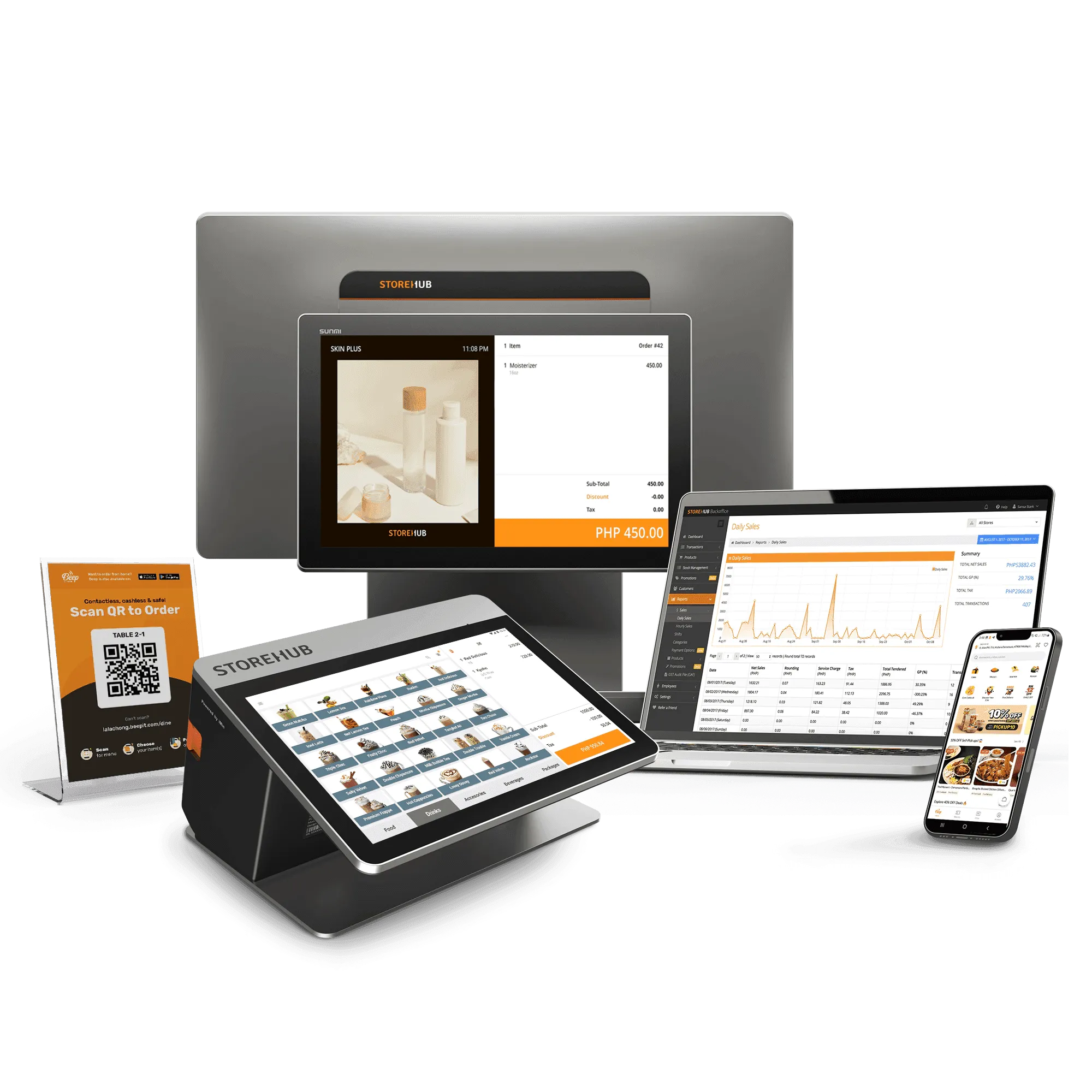
Kitchen routing and QR ordering. StoreHub's Kitchen Display System routes orders to station-specific screens in real time. With QR Order & Pay, guests scan a code at the table, order, and pay from their phones, and the order reaches the same kitchen screens.
Offline selling. StoreHub's POS keeps selling if the Wi-Fi drops and re-syncs when it returns. Ask any provider exactly what keeps working offline, such as printing, cards, and e-wallets.
BIR accreditation and reports. StoreHub is BIR-accredited. It generates X-readings, Z-readings, and e-journals automatically, and it automates senior citizen and PWD discounts, plus VAT exemptions, on the receipt.
Delivery and online ordering. Decide where delivery orders come from (your own ordering channel, third-party apps, or both) and whether they land in the same system as dine-in sales. StoreHub's GrabFood integration is available on the Advanced or Pro plan, and extra fees apply.
Inventory down to the ingredient. A plate of sisig is sold as one dish but stocked as pork, onions, and calamansi. On Advanced and Pro, StoreHub tracks inventory at the recipe level, so each sale deducts the ingredients, and low-stock alerts fire at the reorder thresholds you set.
Payments Filipinos use. Guests pay with GCash, Maya, GrabPay, QR Ph, bank payment apps, cards, and cash. StoreHub accepts all of these through the POS. Ask any provider for its full rate card in writing before you sign.
Reports you can read from your phone. Sales by item, by hour, and by staff member show what sells and when. StoreHub's reports break sales down that way, and the Manager App lets you check performance anytime, anywhere.
More than one branch. Even with one restaurant today, ask what a second branch would add in setup and cost. On Advanced and Pro, StoreHub manages 2 or 200 outlets from a single dashboard, with stock transfers between outlets.
Which setup fits your restaurant type
Every restaurant needs the same core. Your type decides which part gets stretched first.
If you run | Look at first | Read next |
|---|---|---|
A casual or family restaurant | Table orders, split bills, kitchen routing | |
A fine dining room | Modifier accuracy, ingredient cost, visibility when you are off-site | |
A restaurant group with 2 or more branches | Branch sync, one menu, branch-level BIR reports | |
A cafe chain outgrowing its first system | Stock and sales sync across branches, remote visibility | |
A bakery or cake shop | Recipe-level ingredient costing, custom orders | |
A dessert shop or chain | Menu consistency across branches, repeat customers | |
A food kiosk, cart, or stall | Speed at a small counter, cashless payments, compact setup | |
A canteen or food court stall | Lunch-rush speed, staff clock-ins, mall reporting | |
A quick-service counter | Order speed and cashless payments |
Single cafe or bakery? Start with StoreHub for cafes and bakeries.
BIR receipts and SC/PWD discounts: what to check
BIR sets these rules, not your POS provider, so read the source and ask your RDO.
Accreditation and registration. Under BIR RMO 24-2023, a POS must be BIR-accredited, and each machine is registered with a Permit to Use (PTU). Receipts print the supplier's accreditation number and the machine's PTU number. Ordering machines that don't issue invoices need a PTU but not accreditation. For order-taking tablets, confirm with your RDO.
Invoice first. Under BIR RR 11-2024, the invoice is the principal sales document, and an official receipt only proves payment. Confirm with your RDO what your receipts should say and show.
Senior citizen (SC) and PWD discounts. These sales come with their own discount and VAT rules, and computing the bill by hand at a full table is easy to get wrong.
E-invoicing. BIR's e-invoicing rollout (RMC 98-2026, September 22, 2026) requires covered taxpayers, such as e-commerce sellers, large taxpayers, and taxpayers using a computerized accounting system (CAS) or other invoicing software, to issue e-invoices by December 31, 2026, and micro taxpayers (gross sales under PHP 3 million a year, per RR 8-2024) are exempt. Ask your RDO whether your restaurant is covered.
Rules change, so confirm current requirements with BIR or your RDO. This is not tax advice.
Questions to ask any provider
Put these to every sales rep, ours included.
Is it a subscription or a one-time payment, and what does year one cost? Ask whether the monthly rate you are quoted assumes annual billing. Our restaurant POS price guide breaks the cost down layer by layer.
What do delivery integrations cost? Ask for setup and ongoing fees up front.
Who registers each machine with BIR, and how long does it take? Get the steps and the timeline in writing.
How will the system handle BIR's e-invoicing rollout? If your business is covered, ask what changes and when.
What does leaving cost? Ask whether you can take your menu, sales history, and stock data with you, and what happens at the end of the term.
Voices from Filipino F&B operators on StoreHub
On choosing a POS for a growing restaurant:
"I explored many POS options, but none were enough for a growing business. I needed something BIR-accredited, fast, and F&B-friendly. After almost two years with StoreHub, it's proven to be the perfect fit for us."
Jona Lee, Co-Founder of Happilee Korean Kitchen
→ See StoreHub for F&B businesses
More than 20,000 businesses across Southeast Asia run on StoreHub. The Philippine F&B roster includes Happilee Korean Kitchen, The Weekend in Cebu, Candid Coffee, Yardstick Coffee, and others.
When a simpler system is enough
Like any system, StoreHub fits some restaurants better than others. Picture a ten-table lutong-bahay eatery in Iloilo that serves a fixed menu of ulam every day, takes cash, and has no plans for a second branch. For that setup, a free POS like Loyverse on a tablet is the honest recommendation. It is simpler, free to start, and does what that kitchen needs. Whichever you choose, check with your RDO that it meets BIR's POS rules, and ask how your receipts must be issued.
But if you take GCash at the table, sell through delivery apps, or are already sketching a second branch, that is where StoreHub starts to matter, because adding those later means switching systems mid-service.
StoreHub pricing in the Philippines
StoreHub is a subscription, and three plans cover most restaurants. The Starter plan starts from PHP 2,249 per month. Every plan includes one register and one store; extra stores need Advanced or Pro.
Plan | From | Best for |
|---|---|---|
Starter | PHP 2,249/month | One restaurant getting its first formal POS |
Advanced | PHP 4,499/month | Growing restaurants |
Pro | PHP 8,999/month | Established groups that want a full-service setup |
A 14-day free trial is available, no credit card required. StoreHub helps you apply for the BIR Permit to Use for each register. See the pricing page for plan details and terms.
Frequently asked questions
What is the best POS system for restaurants in the Philippines?
There is no single best system, only the best fit for your restaurant. Check BIR accreditation, kitchen routing, offline selling, and delivery handling against how you serve, then test the hard orders in a demo. StoreHub is one BIR-accredited option for your shortlist.
What is a POS system in a restaurant?
A restaurant POS (point-of-sale) system takes orders, sends them to the kitchen, accepts payment, prints receipts, and records sales for your reports. In the Philippines, it also has to be BIR-accredited.
Which POS system is best for managing multiple restaurant locations?
The one that lets you run every branch from one screen, with stock transfers between outlets and reports by branch. StoreHub's Advanced and Pro plans manage 2 or 200 outlets from a single dashboard.
Is StoreHub BIR-accredited in the Philippines?
Yes. StoreHub is a BIR-accredited POS, and it generates X-readings, Z-readings, and e-journals automatically. For what your own restaurant must register or file, check with BIR or your RDO, because the rules change.
What happens if my internet goes down? Can I still sell with StoreHub's POS system?
Yes. StoreHub's POS keeps selling if the Wi-Fi drops and re-syncs when it returns. Ask any provider what exactly keeps working offline, such as printing, cards, and e-wallets.
Does StoreHub integrate with food delivery platforms?
Yes, with GrabFood. The integration is available on the Advanced or Pro plan, and extra fees apply. Ask for setup and ongoing costs up front.
I already have a POS system. Do I need new BIR accreditation if I switch to StoreHub's POS system?
Not for the system itself, because StoreHub is already a BIR-accredited POS. What your own restaurant must register or update when you change systems is a question for your RDO, so ask before you switch.
See StoreHub in action
See how StoreHub runs in restaurants, cafes, and food stalls across Southeast Asia. Book a free demo for a live walk-through.